
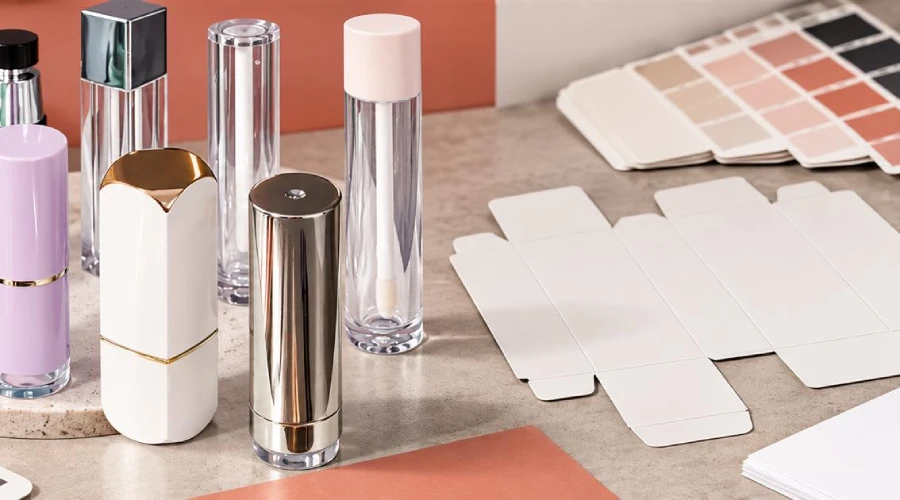
A cosmetic package can look finished on screen and still be unready for production. The file may use an old dieline, contain the wrong shade code, place copy outside the printable area, omit variable SKU information, or show a finish that cannot be reproduced by the selected decoration process.
Artwork approval should therefore be treated as a controlled pre-production release. The goal is not only to approve a design. It is to confirm that the correct content has been placed on the correct structure using a production-ready file, and that the team knows exactly which version is authorized.
1. Lock the product and package before releasing artwork
Artwork should be tied to a defined product, formula, fill quantity, primary component, secondary carton, market, and SKU. If any of these are still changing, identify the file as a working version rather than a production release.
Confirm:
- project, product, SKU, and shade identifiers;
- final component and carton codes;
- fill quantity and package dimensions;
- intended market and language set;
- formula or ingredient-list version;
- barcode, QR destination, or other variable data;
- responsible reviewers and final approval owner.
If the packaging route is not final, first compare stock, semi-custom, and custom cosmetic packaging. Decoration and artwork decisions depend on the actual component and its available print area.
2. Use the final supplier-issued dieline
A dieline is not a decorative template. It represents the structure that will be cut, folded, glued, printed, labeled, or decorated. Verify that the artwork was built on the latest approved drawing for the exact component or carton.
Check cut, fold, glue, window, seal, opening, bleed, safe area, panel orientation, and code locations. Review the assembled orientation, not only the flat file. A design that looks correct when flat may place text upside down, hide it under a flap, or split a visual across a structural edge.
3. Confirm every required and variable content field
Create an SKU matrix rather than reviewing each file from memory. Depending on the product and market, fields can include:
- brand and product identity;
- product function or description;
- shade name and code;
- net quantity;
- ingredient declaration;
- directions, warnings, and other required statements;
- responsible business or distributor details;
- country-of-origin or importer information where applicable;
- barcode, lot-code zone, and other traceability fields;
- approved claims and translations.
The list above is a planning framework, not a universal legal checklist. Requirements vary by product, claim, package, market, and sales channel. For U.S. projects, the FDA Cosmetics Labeling Guide is an official starting point, but the brand should use qualified market-specific review for the final product.
4. Review claims as controlled copy
Do not treat marketing claims as visual filler. Confirm that every claim belongs to the exact product, formula, and market, and that the evidence and wording have been approved by the responsible team. Watch for statements that could change the product’s regulatory treatment or imply an unsupported performance, safety, certification, or environmental benefit.
Lock the approved copy before final prepress wherever possible. Late claim changes can affect layout, translation, panel hierarchy, and the space available for required information.
5. Separate design color from production color
A monitor cannot serve as the only production-color reference. Screen calibration, color mode, substrate, ink, coating, opacity, surface texture, lighting, and decoration method can all change appearance.
Specify the intended color references and proof route. Identify which elements use process color, spot color, foil, metallization, screen printing, hot stamping, labeling, coating, or another method. If color consistency is critical, state which physical proof or approved sample controls the decision.
6. Check file construction and prepress details
| Area | Approval question |
|---|---|
| File | Is this the required format, scale, and final version? |
| Images | Are resolution, links, cropping, and color mode suitable for the intended output? |
| Fonts | Are fonts supplied or converted according to the printer’s instructions? |
| Bleed and safe area | Do backgrounds extend correctly, and is critical copy protected from cuts and edges? |
| White and transparency | Are white ink, knockouts, overprint, opacity, and transparent areas defined correctly? |
| Finishes | Are foil, varnish, embossing, debossing, texture, and coating layers clearly separated and named? |
| Variable data | Does each SKU use the correct shade, barcode, ingredients, quantity, and market copy? |
Technical requirements differ by supplier and process. Request the printer’s or decorator’s specifications rather than applying one universal file setup.
7. Review the complete packaging system
Check primary component, cap, base, label, carton, insert, tray, leaflet, tamper feature, shipper, and any accessory together. Confirm that the artwork matches the physical package and that important information remains visible after assembly.
Artwork approval is also separate from physical compatibility. A correctly printed component can still perform poorly with the formula or filling process. Keep artwork release connected to the cosmetic packaging compatibility plan without treating one approval as evidence of the other.
8. Approve the right type of proof
Different proofs answer different questions:
- a screen PDF can support content and layout review;
- a structural mockup can support panel order and assembly review;
- a color proof can support specified print-color decisions;
- a decorated component can show how artwork behaves on the real material and shape;
- a filled sample can show the complete product presentation.
Record what the proof does and does not approve. A digital proof may confirm copy placement without approving final metallic appearance, rub resistance, adhesion, or curvature distortion.
9. Use version control that prevents accidental release
Keep one source of truth. Use a naming convention that identifies brand or project, product, SKU, package, market, language, revision, and status. Avoid several files called “final,” “final-new,” and “use-this-final.”
The release record should include the exact filename, file checksum or controlled storage location where appropriate, revision, approver, date, approved proof, open items, and next authorized step. Superseded files should remain clearly separated from current production files.
10. Record approval by responsibility
One person should not be assumed to own every decision. Assign reviewers for:
- brand and visual identity;
- product and SKU accuracy;
- regulatory and claims review;
- packaging structure and component fit;
- prepress and decoration feasibility;
- commercial data such as barcode and quantity;
- final release authorization.
Consolidate comments before revision. The final decision should identify what is approved, what remains open, and whether bulk printing or decoration is authorized.
Minimum artwork release checklist
- Correct product, formula, package, market, and SKU confirmed
- Latest supplier dieline used
- All panels and assembled orientation reviewed
- Required and variable copy checked by responsible owners
- Claims and translations approved
- Barcode and code zones verified
- Print colors, materials, and finishes specified
- Prepress construction checked
- Appropriate proof or decorated sample reviewed
- One final file and release record authorized
For the broader handoff from prototype to production, use the makeup sample approval checklist. When your component, dieline, SKU matrix, and artwork status are ready, contact AKIACO with the product format, intended markets, packaging route, order scope, and open production questions.
Frequently asked questions
What should be checked before cosmetic packaging artwork is approved?
Confirm the final structure, dieline, SKU data, required copy, barcode, print setup, decoration, version, proof, and approval owner.
Can one artwork file be used for every cosmetic shade?
Only when all variable details are controlled. Shade names, codes, ingredients, barcodes, claims, and market copy may require SKU-specific files.
Is a screen PDF enough to approve packaging color?
No. A screen review helps check layout and content, but physical print or decoration appearance may require an appropriate proof or sample.
Who should approve cosmetic packaging artwork?
Assign named owners for brand, product, regulatory, packaging, and production checks, with one person authorized to release the final file.
Does manufacturer artwork review replace legal review?
No. Production checks do not replace the brand's market-specific legal and regulatory review of labels, claims, and required information.